Passive income is the holy grail for creators in 2026. While many platforms are becoming oversaturated, becoming an Adobe Stock Contributor remains one of the most reliable ways for photographers, illustrators, and AI artists to monetize their work globally.
By following this comprehensive guide, you can start your journey as a successful contributor today. This isn’t just a basic overview; it is a step-by-step manual designed to take you from a complete beginner to a profitable artist on the world’s leading stock marketplace.
What’s inside this guide?
We’ve covered everything you need to know to succeed in the 2026 market, including:
- What is Adobe Stock? – Understanding the platform and why it’s the best choice for creators.
- How to Sign Up as an Adobe Stock Contributor – A quick, hassle-free setup guide to get your account running today.
- Technical Requirements for Uploading Files to Adobe Stock – Mastering the essential “4MP” rule, resolution standards, and file formats (JPEG, PNG, AI, and SVG).
- AI & Modern Tools – How to legally and effectively leverage AI tools like Midjourney, Adobe Firefly, and Canva to build a high-demand portfolio in Adobe Stock.
- How to Withdraw Your Earnings in Adobe Stock – The best payment methods and strategies to maximize your monthly payout.
Whether you are a professional designer or an AI enthusiast, this guide provides the exact roadmap you need to build a sustainable digital income stream.
1. What is Adobe Stock and How Does it Work?
At its core, Adobe Stock is a massive global marketplace that connects digital creators with millions of buyers, including graphic designers, marketing agencies, and major corporations. Because it is natively integrated into the Adobe Creative Cloud ecosystem (Photoshop, Illustrator, InDesign), it is the go-to resource for professionals looking for high-quality visual assets.
As an Adobe Stock Contributor, you act as a vendor on this platform. Here is the step-by-step breakdown of how the ecosystem functions in 2026:
1. Upload Your Assets
You contribute your original work to the platform. This includes high-resolution photographs, vector illustrations (AI/EPS/SVG), and even AI-generated art created through tools like Midjourney or Adobe Firefly.
2. The Review Process
Once uploaded, every file goes through a rigorous moderation process by the Adobe team. They check for:
- Technical Quality: Focus, lighting, and “4MP” resolution standards.
- Commercial Viability: Is this something a business would want to buy?
- Legal Compliance: Ensuring there are no copyrighted logos, recognizable people without model releases, or intellectual property violations.
3. Licensing to Buyers
When a buyer finds your work and likes it, they purchase a license to use it. They don’t “own” the image itself, but they pay for the right to use it in their advertisements, websites, or social media campaigns.
4. Earning Royalties
Every time a customer downloads your file, you earn a Royalty. This is a percentage of the price the customer paid for the license. The best part? A single image can be sold hundreds or even thousands of times, creating a true passive income stream that grows as your portfolio expands.
Pro-Tip for TechXploria Readers: “The real power of Adobe Stock lies in its ‘Search Engine.’ By using the right keywords and titles, your images can stay relevant and continue generating sales for years after the initial upload. It’s a long-term digital asset that works for you 24/7.”
2. How to Sign Up as an Adobe Stock Contributor?
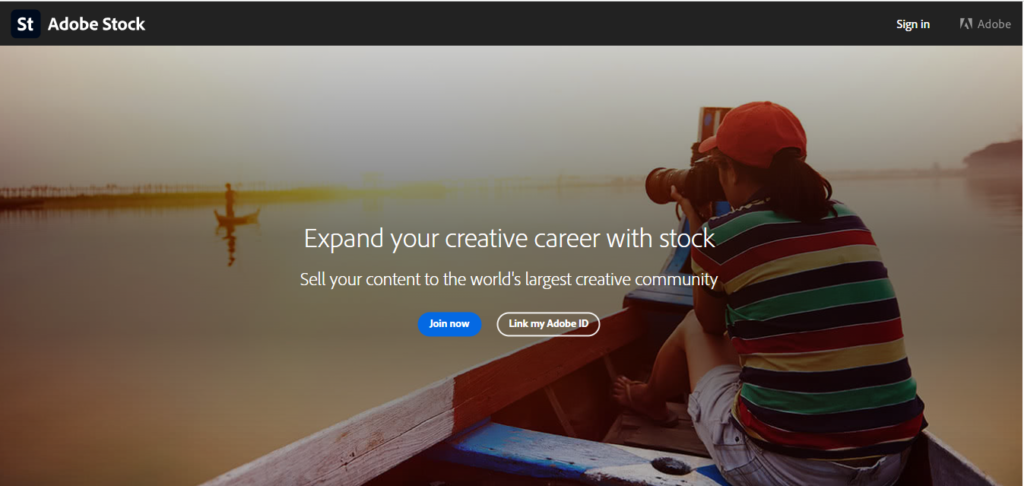
When you go to the Adobe Stock Contributor Portal, you’ll see two options:
- Join Now: Use this if you don’t have an Adobe ID yet. It will guide you through creating one and linking it to your contributor account.
- Link My Adobe ID: Use this if you already have an Adobe ID. It connects your existing Adobe account to the contributor portal instantly.
Once you’ve chosen the appropriate option and signed in:
- Upload Your First Content
Start with a few high-quality images, illustrations, or videos. Adobe Stock will review each submission to ensure it meets their technical and content standards. - Add Titles, Keywords, and Categories
Accurate and descriptive metadata helps buyers find your work. Avoid keyword stuffing and focus on relevance. - Wait for Approval
Review usually takes a few days. Approved content goes live, and rejected submissions often come with feedback so you can improve. - Start Earning
Once your content is live, every download earns royalties. Track your sales and performance in the contributor portal.
Pro Tip: Consistency is key. Upload regularly and focus on quality to gradually build a strong portfolio.
3. How to Withdraw Your Earnings from Adobe Stock?
Adobe Stock uses a “Royalty” system, meaning you earn a percentage of every sale. Before you hit that “Payout” button, ensure you meet the following criteria:
1. The Minimum Payout Threshold
You cannot withdraw your money at any time. You must reach a minimum balance of $25 (USD) in earned royalties.
- Pro-Tip: In 2026, most successful contributors wait until they hit $100 or more to withdraw, as this helps in better financial tracking for your TechXploria business records.
2. The 45-Day Waiting Period
For new contributors, there is a one-time security hold. Your first payout can only be requested 45 days after your first sale is made. After this initial period, you can request payments as soon as you hit the $25 limit.
3. Supported Payment Methods
Adobe does not send physical checks or direct bank transfers in most regions. Instead, they use digital payment processors. The most common options for USA and international creators are:
- PayPal: The most popular and fastest option.
- Payoneer: Great for international creators who want to transfer funds directly to a local bank account.
- Skrill: A reliable alternative available in many countries.
4. Steps to Request a Payout
- Log in to your Contributor Portal.
- Click on the “Insights” or “Earnings” tab.
- If your balance is over $25, you will see a blue “Payout” button.
- Select your preferred payment method (e.g., PayPal).
- Confirm your email address and click Submit.
5. Processing Time
Once requested, payments are usually processed within 7 to 10 business days. You will receive an email confirmation once the funds have been sent to your chosen account.
Crucial Reminder for TechXploria Readers: “Make sure your Tax Form (W-8BEN or W-9) is approved before you request a payout. If your tax information is missing or pending, Adobe will block the payout button to comply with IRS regulations.”
4. What Types of Content Can I Upload to the Adobe Stock?
Adobe Stock is no longer just for professional photographers. It is a diverse marketplace looking for various types of visual media. If you are a creator, chances are you already have something you can sell.
1. High-Resolution Photos (JPEG)
This remains the most popular category. Buyers are constantly searching for authentic, high-quality images.
- Trending in 2026: “Authentic lifestyle” photos, real people doing real things are outselling perfectly posed studio shots.
- Technical Tip: Ensure your photos are at least 4MP and saved as high-quality JPEGs. Avoid heavy filtering. Buyers want “clean” files they can edit themselves.
2. Vector Graphics (AI, EPS, and SVG)
As we discussed earlier, vectors are a goldmine for Adobe Stock Contributors. Because they can be scaled to any size without losing quality, they are essential for logo designers and marketers.
- What to upload: Icons, infographics, UI elements, and background patterns.
3. Illustrations and AI-Generated Art
In 2026, Adobe Stock is a leader in accepting AI-generated images.
- The Rules: You can upload digital illustrations and AI art from tools like Midjourney or Adobe Firefly, but you must label them as “Created using AI tools.”
- Quality: AI art must still meet the 4MP resolution requirement and be free of “AI artifacts” (like weird fingers or distorted text).
4. Video Footage (SFM, MP4)
Video content (B-roll) often commands a much higher royalty than still images.
- What’s in demand: 4K vertical video (for TikTok/Reels ads) and 5-60 second cinematic clips.
- Tech Spec: Standard 1080p is okay, but 4K is the industry standard for high-earning contributors.
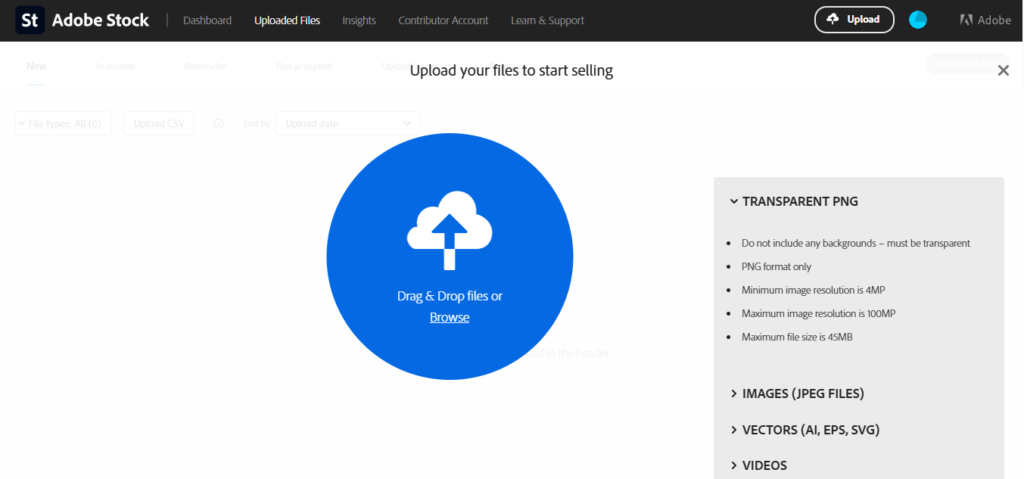
5. Transparent PNGs (Isolated Objects)
This is a massive time-saver for designers. Instead of a full photo, you upload an object with the background already removed.
- Examples: A single tropical leaf, a 3D gold coin, or a professional tech gadget.
- Requirement: The background must be 100% transparent and the edges must be smooth.
Pro-Tip for TechXploria Readers: “Don’t try to do everything at once. Pick one niche like Transparent PNGs or Minimalist Vectors and build a deep portfolio in that category first. Specializing helps the Adobe algorithm recognize you as an authority in that specific style.”
5. What are the technical requirements for uploading content to Adobe Stock?
Adobe Stock has some of the strictest quality controls in the industry. If your file doesn’t meet their mathematical “4MP Rule” or follows the wrong format, it will be rejected instantly by their automated system.
Here is exactly how to prep your files for a 100% acceptance rate.
1. Decoding the “4MP Rule” (It’s Not Just Megapixels)
Many beginners confuse Megabytes (file size) with Megapixels (image dimensions). Adobe requires every image or vector to be at least 4 Megapixels (4MP).
- The Math: To find your Megapixels, multiply the Width by the Height of your image.
- Example: An image that is 2000 x 2000 pixels = 4,000,000 pixels (4MP).
- The Minimum Standard: Your image should ideally be 2000 x 2000 pixels or larger.
- Maximum Limit: Adobe accepts up to 100MP, but staying between 12MP and 24MP is the “sweet spot” for quality and upload speed.
2. Accepted File Formats in 2026
Ensure you are exporting your work in the correct “container” for its type:
- Photos & AI Art: Must be JPEG format. Save them at the highest quality setting (10-12) to avoid “compression artifacts.”
- Vectors: Must be AI, EPS, or SVG. If you use Canva, ensure you export as an SVG to maintain scalability.
- Transparent Graphics: Must be PNG with Transparency (Alpha channel).
- Video: MOV, MP4, or MPG formats with a minimum resolution of 1080p (4K preferred).
3. The Secret Weapon: AI Upscaling
What if your AI tool (like Midjourney) or your older smartphone camera produces an image smaller than 4MP? This is where AI Upscaling comes in. It uses neural networks to add pixels without making the image look “blurry” or pixelated.
Recommended AI Upscaling Tools:
- Topaz Gigapixel AI – topazlabs.com/gigapixel-ai (Professional Standard)
- VanceAI – vanceai.com (Great for Web-based upscaling)
- Upscale.media – upscale.media (Fast and Free option)
- Magnific AI – magnific.ai (Best for adding high-end detail)
- Adobe Lightroom (Super Resolution) – adobe.com/products/photoshop-lightroom
A Warning for TechXploria Readers: Do not simply “resize” an image in Paint or Photoshop by stretching it. This creates “Pixelation,” and Adobe’s reviewers will reject it immediately. Always use an AI-based Upscaler to maintain sharpness and detail when hitting that 4MP requirement.
6. What Types of Content Sell Best in Adobe Stock in 2026?
Success on Adobe Stock isn’t just about uploading “pretty” pictures; it’s about uploading what businesses are actively searching for. In 2026, the demand has shifted toward emotional resonance and high-energy visuals.
1. Top Performing Categories by Demand
- “All the Feels” (Sensory Experience): 2026 is the year of tactile visuals. Images that evoke a sense of touch, taste, or sound are top sellers. Think of hyper-realistic textures (like “squishy” surfaces, soft fabrics, or cold condensation on a glass) and POV (Point-of-View) shots that make the viewer feel like they are in the scene.
- “Connectioneering” (Authentic Human Bonds): Buyers are tired of fake smiles. They want “messy” authenticity, tired parents, real office humor, or genuine laughter between friends. Candid, unposed imagery is currently outperforming staged studio photography.
- “Surreal Silliness” (Creative AI & Absurdism): With tools like Adobe Firefly, there is a massive market for “delightfully strange” visuals. Visual jokes, dreamlike digital collages, and exaggerated scales (e.g., a giant cat in a tiny city) are popular for social media ads that need to “stop the scroll.”
- “Local Flavor” (Cultural Authenticity): Global brands are looking for hyper-local content. Street scenes from Tokyo, traditional fashion from India, or local food rituals from Sri Lanka that feel spontaneous rather than touristy are in high demand.
2. Orientation Strategy: Landscape vs. Portrait vs. Square
In 2026, your “Orientation” choice is a business decision. Here is how to choose:
| Orientation | Best For… | Sales Potential |
| Landscape (16:9 / 3:2) | Website banners, Desktop Ads, YouTube Thumbnails. | High Versatility. Buyers prefer this because it’s easy to crop into a square or vertical format later. |
| Portrait (9:16 / 4:5) | TikTok Ads, Instagram Reels, Mobile App UI. | Trending. Essential for the mobile-first economy. However, it’s harder to turn a vertical shot into a horizontal one. |
| Square (1:1) | Social Media feeds and Profile-based marketing. | Niche. Best for specific ad placements. |
The Professional Rule: If you are on a shoot, shoot Landscape first. It gives the buyer the most “Copy Space” (empty room to add their own text and logos).
3. Additional Tips for High Sales
- Leave “Copy Space”: Don’t fill the entire frame with your subject. Leave an “empty” area (like a clear sky or a plain wall) so a graphic designer can overlay text. Images with copy space sell 3x more frequently.
- The “3-Variation” Rule: Don’t spam the same image. Adobe’s 2026 algorithm favors quality over quantity. Submit a maximum of 3 variations of the same scene (e.g., one wide shot, one close-up, and one with a different focal point).
- Metadata is King: Use the first 10 tags for your most important keywords. If your image is AI-generated, you must disclose it in the metadata settings to avoid account suspension.
- Consistency over Intensity: Uploading 5 high-quality images every week is better for your ranking than uploading 100 images once and disappearing for a month.
Conclusion
Building a passive income stream through Adobe Stock is no longer just for elite photographers with expensive gear. In 2026, the playing field has leveled. Whether you are capturing authentic human moments on your smartphone, designing minimalist vector icons, or generating surreal art with AI, the opportunity to monetize your creativity has never been greater.
Success on this platform doesn’t happen overnight, but it is remarkably consistent. By mastering the 4MP rule, utilizing AI upscaling to maintain quality, and staying ahead of 2026 trends like “Connectioneering” and “Local Flavor,” you are building a digital asset that works for you while you sleep.
The most important step is the first one. Start by uploading five high-quality files this week. Monitor your insights, refine your keywords, and keep your portfolio growing. Your future self will thank you for the royalties hitting your account.